* All product/brand names, logos, and trademarks are property of their respective owners.
Managing a medical practice involves much more than treating patients. Healthcare professionals must maintain accurate medical records, coordinate appointments, protect sensitive information, and ensure that clinical staff can access the information they need. When these processes rely on outdated systems or disconnected records, administrative work can become unnecessarily complicated.
Cloud-based EHR software offers an alternative by allowing authorized users to access electronic health records through an internet-connected system. Instead of depending entirely on servers and infrastructure maintained at the practice, healthcare organizations can use a cloud-hosted platform to manage patient information and clinical workflows.
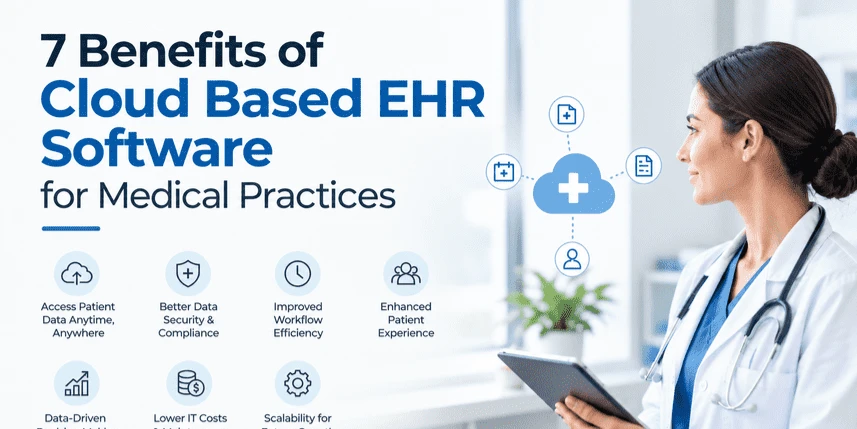
For small clinics, independent practitioners, and growing medical practices, this approach can offer practical advantages. Here are seven benefits worth considering before choosing a cloud-based electronic health record system.
One of the main advantages of cloud-based EHR software is the ability to access patient records from different locations, provided users have the necessary permissions and a reliable internet connection.
This flexibility can be useful for physicians working across multiple clinics, healthcare groups with several locations, and providers who need to review records outside their usual workplace. Authorized staff can access relevant patient information without relying on a single computer or physical server at the clinic.
For example, a physician covering another branch may need to review a patient's medication history or previous consultation notes. A cloud-based system can make that information available without requiring staff to transfer files manually.
However, remote access should always be protected with appropriate authentication, access controls, and secure devices. Convenience should never come at the expense of patient confidentiality.
Paper records and disconnected digital systems can create repetitive tasks. Staff may need to enter the same information multiple times, search through physical files, or manually transfer details between departments.
Cloud-based EHR software can help centralize patient information and reduce unnecessary duplication. Depending on the system's features, practices may also be able to automate appointment reminders, generate clinical documents, manage prescription workflows, and simplify billing-related tasks.
Reducing administrative friction gives staff more time to focus on patient coordination and other responsibilities.
The actual time saved depends on how the software is configured and whether it fits the practice's existing processes. Before implementation, identify the tasks that consume the most staff time and confirm that the selected system can address them.
Healthcare providers researching available options can explore the AppFinderGuru software directory to discover software categories and compare solutions relevant to their business needs. Use any directory as a starting point, then verify product capabilities, pricing, security documentation, and regulatory suitability directly with the vendor.
Patient care often involves several people, including physicians, nurses, administrative staff, specialists, and laboratory personnel. When each person works with incomplete or outdated information, communication becomes more difficult.
A cloud-based EHR can provide authorized team members with access to a shared patient record. Depending on its capabilities, the system may include consultation notes, medication lists, allergies, test results, and treatment plans.
This shared information can help reduce communication gaps and make it easier for clinicians to understand a patient's medical history.
For example, when a patient returns for a follow-up appointment, a physician may be able to review previous consultation notes and available test results before recommending the next steps.
Effective coordination still requires accurate documentation and clear responsibilities. Software supports communication, but healthcare professionals must ensure that records are updated correctly and that clinical decisions are based on appropriate information.
Patient records contain sensitive personal and medical information, making data protection a major responsibility for every healthcare practice.
Cloud-based EHR providers may offer security features such as encryption, role-based permissions, access logs, automated backups, and disaster recovery capabilities. These features can help practices protect information and recover records following certain technical failures.
Cloud hosting can also reduce the burden of maintaining physical servers and managing some infrastructure-related security tasks internally. However, it does not automatically make a system secure.
Healthcare providers should evaluate how data is encrypted, where it is stored, how access is monitored, how backups are maintained, and what happens if the service experiences an outage.
Compliance requirements vary by jurisdiction. Practices should verify that their chosen provider supports applicable privacy and healthcare regulations, review contractual responsibilities, and establish appropriate internal security policies.
A system that works for one physician and a small administrative team may become difficult to manage as a practice grows.
Adding clinicians, opening another location, or increasing patient volume can place additional demands on existing infrastructure. Traditional systems may require new hardware, additional maintenance, or more complex arrangements for sharing records.
Cloud-based EHR software can make expansion easier because providers often offer subscription plans and configurable user access. A practice may be able to add users or enable additional capabilities without building an entirely new server environment.
This can be particularly useful for growing clinics and healthcare groups that want a consistent way to manage patient records across locations.
Before committing, review user limits, storage allowances, subscription tiers, data migration options, and the cost of additional modules. A system that appears affordable initially may become expensive as the practice expands.
Administrative delays can affect the patient experience. Long registration processes, missing records, repeated requests for information, and scheduling difficulties may create frustration for both patients and staff.
Depending on its features, cloud-based EHR software can help practices organize patient information, streamline documentation, coordinate appointments, and support more consistent workflows.
Some platforms also integrate with patient portals, allowing patients to access selected health information, request appointments, or complete forms online. These features can reduce unnecessary phone calls and help patients prepare for visits.
Consider a clinic that frequently experiences delays because staff cannot locate previous records quickly. A well-configured EHR system can make those records easier to retrieve, helping clinicians prepare for consultations more efficiently.
The goal is not simply to digitize existing paperwork. Practices should review their workflows and remove unnecessary steps wherever possible.
Medical practices need reliable information to understand how their operations are performing. Appointment patterns, patient volumes, billing activity, and clinical documentation can all provide useful insights when collected and reported appropriately.
Many cloud-based EHR platforms include reporting and analytics features. Depending on the product, practice managers may be able to monitor appointment utilization, identify administrative bottlenecks, review outstanding documentation, and assess operational trends.
For example, reports may reveal that certain appointment slots are frequently underused or that patient registration regularly causes delays. Managers can investigate these patterns and adjust staffing or scheduling processes accordingly.
Clinical data may also support care coordination and quality improvement when used appropriately, with suitable safeguards for privacy and data accuracy.
Reporting capabilities vary significantly between products. Before purchasing a system, check which reports are included, whether custom reporting is available, and whether data can be exported for further analysis.
The benefits of cloud hosting depend on choosing a system that matches your practice's size, specialty, budget, and operational needs.
Start by identifying your most important requirements. A solo practitioner may prioritize straightforward documentation and appointment management, while a multi-location clinic may need advanced permissions, reporting, and integration capabilities.
Evaluate the following factors before making a decision:
Comparing these factors can help practices avoid choosing a system based solely on its advertised features or introductory subscription price.
Cloud-based EHR software can help medical practices improve patient record accessibility, reduce administrative duplication, coordinate healthcare teams, and manage information more efficiently. It can also support practice growth, strengthen recovery arrangements, improve workflows, and provide useful operational reporting.
However, these benefits are not automatic. They depend on the software's capabilities, implementation quality, staff training, reliable connectivity, and appropriate data protection practices.
Before selecting a platform, map your existing workflows, identify recurring problems, and involve both clinical and administrative staff in the evaluation. A system that fits the practice's daily needs is more likely to deliver lasting value than one chosen simply because it offers the largest feature set.
With careful planning and the right safeguards, a cloud-based EHR can become a practical foundation for more organized and responsive healthcare operations.

More and more companies across the US are implementing commercial solar projects as electricity cost
6 October 2026
Servers are at the heart of many modern businesses. They store important data, run applications, hos
24 September 2026
Businesses rely on servers for many of their most important daily operations. Websites, databases, b
23 September 2026
Be the first to share your thoughts
No comments yet. Be the first to comment!
Share your thoughts and join the discussion below.










.webp&w=3840&q=75)